“We only changed providers – and now no mail arrives.” Almost always the cause is a forgotten record or bad timing. A fixed order of steps avoids that.
Three kinds of “migration”
In everyday language it is all called a “move”, but technically there are three different operations:
1. Hosting change: the website gets a new IP address. The DNS provider stays; the A/AAAA records (and possibly MX) change.
2. DNS provider change: the domain's name servers change. The complete zone must exist at the new provider before the delegation is switched.
3. Registrar change (domain transfer): the domain is moved to another registrar. The name servers can stay the same.
If you do several of these at once, errors are hard to trace. Do them one after another, a few days apart.
Lower the TTL early
The TTL (time to live) defines how long resolvers cache a record. If it is set to 24 hours, resolvers may keep serving the old IP for up to a day after the change.
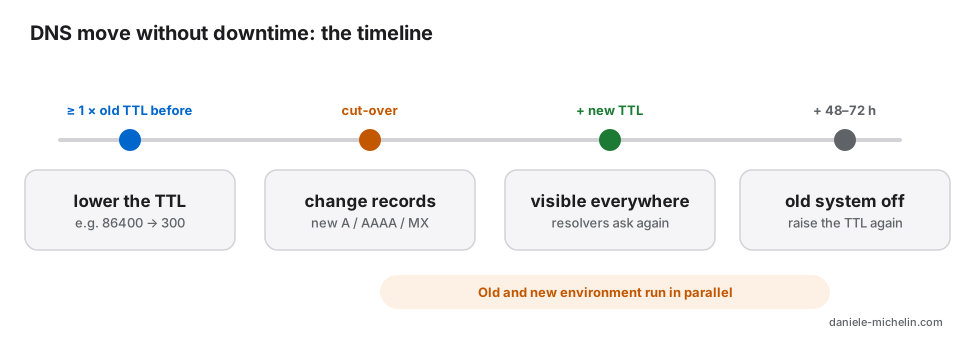
So: lower the TTL of the affected records (A, AAAA, MX, CNAME) at least as long before the move as the old TTL – for example to 300 seconds. Raise it again after a successful migration.
For a name server change this only applies in part: the delegation (NS records at the top-level domain's registry) usually has a fixed TTL, often 24 hours or more, which you cannot lower yourself. Old and new name servers should therefore give identical answers during that time.
Copy the zone completely
Before the switch everything must exist at the new provider, not just the website:
A/AAAA for the apex and www and every subdomain, MX records with priorities, TXT records (SPF, DKIM keys, DMARC, verification for Google, Microsoft, Search Console), CNAMEs (e.g. autodiscover), SRV and CAA records.
TXT records for e-mail authentication are forgotten most often. The result is mail in spam or rejected messages (see also the article on SPF, DKIM and DMARC).
The old provider often offers an export as a zone file. If not, query the main types:
for t in A AAAA MX TXT CNAME NS CAA; do dig +noall +answer example.com $t; doneSubdomains obviously cannot be enumerated this way – open the old provider's control panel and compare record by record.
Thousands of records? Export the zone, do not retype it
For large zones retyping is not worth it — and it is error-prone. The options, in this order:
- Export a zone file: many providers offer an export in BIND format, and most new providers import that file directly (e.g. Cloudflare “Import DNS records”, PowerDNS with
pdnsutil load-zone example.com zone.txt). - Zone transfer (AXFR): if the old provider allows a transfer to your IP,
dig AXFR example.com @ns1.old-provider.comfetches the whole zone. Usually it is only enabled for secondary name servers — it is worth asking. - Via the API: tools such as OctoDNS or DNSControl read the zone at the old provider and write it at the new one; afterwards you can keep the zone as a file in Git.
- Do not guess: DNS queries cannot list unknown names completely. Without export, AXFR or API, only the list in the old control panel is left.
After the import, compare old and new before switching the name servers:
for n in example.com www.example.com; do for t in A AAAA MX TXT CNAME CAA; do
  diff <(dig +short @ns1.old-provider.com $n $t | sort) <(dig +short @ns1.new-provider.com $n $t | sort) >/dev/null || echo "differs: $n $t"
done; done
Test before switching
New web server: curl can force a host name to an IP without touching DNS:
curl -I --resolve example.com:443:203.0.113.10 https://example.com/New name server: query the zone there directly before changing the delegation:
dig @ns1.new-provider.example example.com A
dig @ns1.new-provider.example example.com MX
Order of steps on migration day
1. Synchronise the data one last time. For shops, forums and forms, pause writes briefly or sync again right before the switch, otherwise orders or posts get lost.
2. Switch DNS (IP address or name servers).
3. Keep the old environment running for another 48 to 72 hours. Resolvers with an old cache would otherwise hit nothing.
4. Treat e-mail separately. Mailbox contents do not move with DNS. They have to be transferred separately (for example with an IMAP sync). Only when the new mailboxes are filled, switch the MX.
Verify after the migration
dig +trace example.com
dig @1.1.1.1 example.com A
dig @8.8.8.8 example.com A
Different resolvers show how far the change has propagated. Also check: does the TLS certificate work? With Let's Encrypt (HTTP-01) port 80 must be open and every existing AAAA record must point to the new server. Do redirects and www work? Can you send and receive a test mail? Are Search Console and monitoring free of errors?
Typical mistakes
Forgotten AAAA record: IPv6 users keep landing on the old server – and Let's Encrypt prefers IPv6 for validation.
TTL not lowered in time: the switch takes a day instead of minutes.
CAA record only allows the previous certificate authority, but the certificate at the new host comes from another one.
Subdomains and special records forgotten: autodiscover, mail, shop, verification TXT records.
Cancelling the old contract too early: during the transition both sides should stay reachable.
Checklist
- TTL lowered to 300 seconds at least one old TTL before the move?
- Zone complete at the new provider, including MX, TXT, CAA, subdomains?
- New server and new name servers tested beforehand?
- Data synchronised one last time, writes briefly frozen?
- Old environment kept running for 48–72 hours?
- Mailboxes migrated separately, MX switched afterwards?
- After the move: resolvers, certificate, IPv6, redirects, test mail checked?
- TTL raised again?
A clean migration is less magic than discipline: prepare early, copy completely, test before switching and then check patiently.
Translated from the German original.